
• Services
  • Pricing
  • Contact
Sign InBook Demo

Making construction more efficient through data.

Download on theApp StoreGet it on Google Play

© Copyright 2026 Bimefy BV. All Rights Reserved.
Company Registration Number: BE0800764890

Product
  • Features
  • Use Cases
  • Integrations
  • Pricing
  • Documentation
  • FAQ
Services
  • BIM-Coordination
  • BIM-Modelling
  • BIM-Management
  • BIM-Software
  • Customer Log In
Company
  • Bimefy
  • Blog
  • Contact
  • Careers
Supported by
  • imec.istart
  • Start it @KBC
  • VLAIO
  • AWS Activate
  • Microsoft for Startups
  • Hubs4Growth
  • POM Limburg
  • Smart Futures Lab
  • Flanders Investment & Trade
Legal
  • Terms of Service
  • Privacy Policy
  • Cookie Policy
  • Platform Uptime
  1. Integrations
  2. Insta360
Insta360 logo

Reality capture integration

Capture your construction site with Insta360 and Bimefy

Capture construction sites with supported Insta360 cameras through the Bimefy mobile workflow. Bimefy processes 360° captures and connects them with BIM, planning and previous site reality so teams can document progress and understand what is changing on site.

Request a demoExplore Reality Capture
Insta360 logoInsta360
Bimefy
  • BIM
  • Planning
  • 360° captures
360° site reality in construction context

From a site walk to construction intelligence

Bimefy supports Insta360 X-series cameras as part of a lightweight 360° construction site-capture workflow. A site team can record a regular walkthrough, place the capture in the right project, and build a visual record without specialist scanning equipment.

The useful part begins after capture. Bimefy processes and organises 360° site captures in the project environment, where they can be viewed with project locations, previous site visits, BIM and planning information instead of remaining isolated image files.

This is more than storage for a 360° photo. Repeated captures make it possible to review what was visible at a location over time, use visual evidence in progress conversations, and compare the site with the digital construction reference.

Insta360 captures the physical site. Bimefy provides the project context around it: capture history, BIM, planning and the rest of the construction record. Bimefy supports Insta360 cameras; it is not an Insta360 app or an official partnership claim.

What the integration enables

What supported Insta360 capture adds to a Bimefy project.

Capture in the field workflow

Use a supported Insta360 camera as part of the Bimefy mobile reality-capture workflow for regular construction site walks.

Put captures in the right project

Upload 360° site captures into the Bimefy project so the field record does not need to be moved through disconnected tools.

Process and organise captures

Bimefy prepares captured 360° data for project use and keeps it organised as part of the project capture history.

Keep project context attached

Review captures with their project location, date and the other information that gives a site walk meaning.

Connect BIM and site reality

Use BIM as the digital reference and 360° capture as the site-reality layer when reviewing the same project context.

Build a visual history

Regular walkthroughs accumulate as dated captures, making it easier to review how a location changed over time.

Built into a Bimefy project workflow

Capture → process → position → compare → understand. The site walk becomes a usable project record, not a disconnected folder of 360° files.
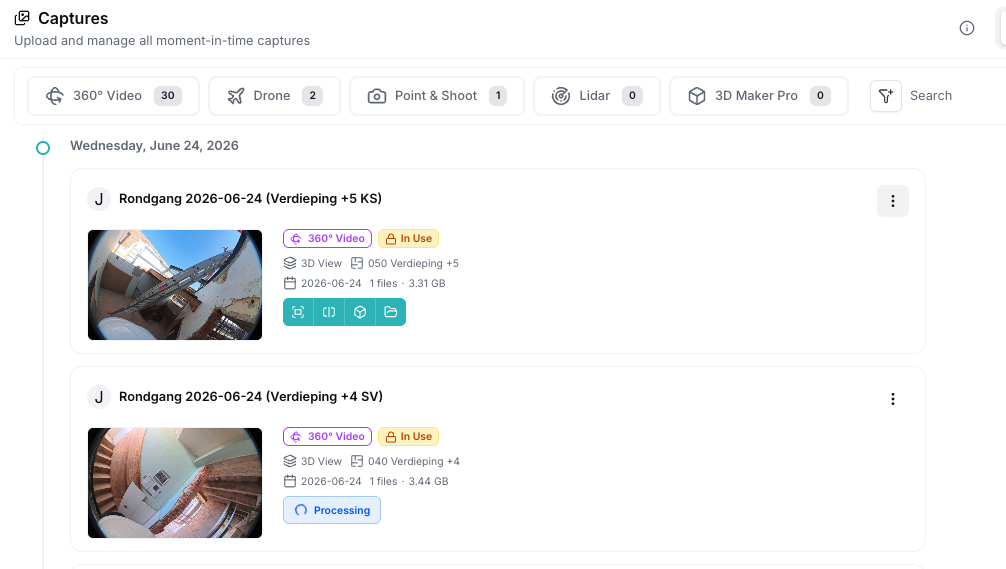
Bimefy capture history showing dated 360° site walkthroughs in a project
Processed 360° walkthroughs are retained as dated project captures.
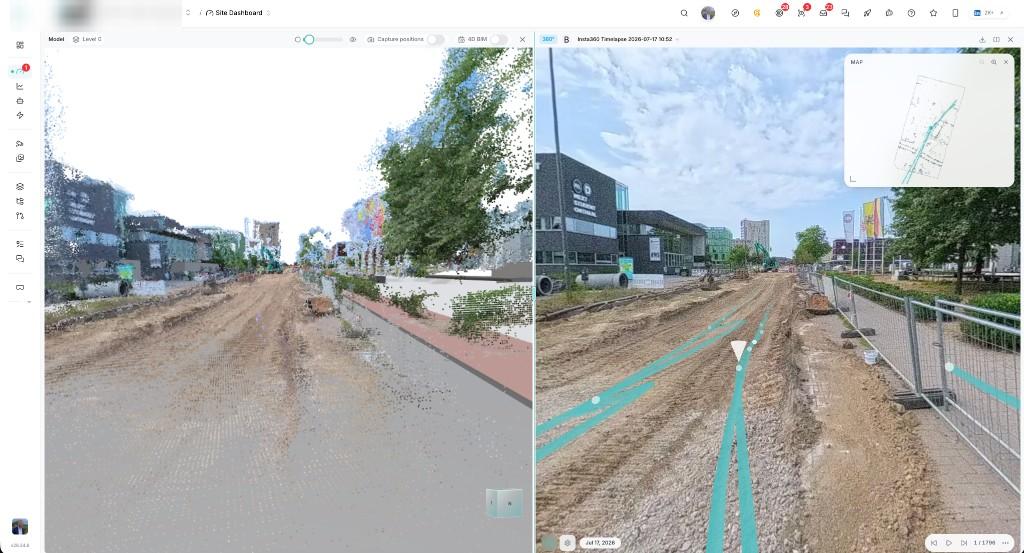
Bimefy showing a BIM model alongside a 360° construction site capture
BIM provides the digital reference; the 360° capture shows the site reality.

Supported Insta360 cameras

Use the Insta360 camera your team already has. Bimefy supports multiple generations of the Insta360 X-series for 360° construction site-capture workflows.

  • Insta360 X3Supported for Bimefy site capture
  • Insta360 X4Supported for Bimefy site capture
  • Insta360 X4 AirSupported for Bimefy site capture
  • Insta360 X5Supported for Bimefy site capture
  • Insta360 X6Supported for Bimefy site capture

How Insta360 site capture works with Bimefy

Five steps from a site walk to a clearer understanding of what changed.

  1. 1Capture

    Walk the site with a supported Insta360 camera as part of a regular Bimefy mobile capture workflow.

  2. 2Upload

    Transfer the 360° capture into the correct Bimefy project instead of moving files between separate tools.

  3. 3Process

    Bimefy prepares and organises the capture for visualisation and use in the project record.

  4. 4Connect

    Review site reality with project locations, BIM, planning and previous captures.

  5. 5Understand

    Use the capture history to support progress tracking, remote review and visual project documentation.

What teams do with it

Practical ways recurring 360° site capture can support the project.

Construction progress tracking

Capture the site regularly and use the visual history to understand how construction is progressing.

Remote site review

Let project stakeholders review current and historical site conditions without walking every location themselves.

Visual project documentation

Create a recurring 360° record of construction activity that remains in the project context.

BIM vs reality

Use the BIM model as the digital reference and the 360° capture as the site-reality layer for review.

Progress meetings

Use recent and previous captures to review work completed since the last site visit.

Why Insta360 and Bimefy work well together

Insta360 makes it practical to record a construction environment during an ordinary site walk. It gives a team a lightweight way to capture more visual context than a set of individual photos.

Bimefy turns those captures into structured project information by keeping them with BIM, planning, locations and construction history. The capture can then be revisited as part of the project rather than searched for in a file folder.

BIM shows what should exist. Insta360 shows what exists on site. Bimefy connects the two in the same construction context.

Who is this for?

Roles that need regular visibility into site conditions.

  • Site managers documenting regular walks and reviewing what was visible on a given day.
  • Project managers who need a shared visual record for progress conversations.
  • BIM managers reviewing site reality alongside the digital construction reference.
  • VDC teams connecting 360° site reality with model-based workflows.
  • Construction managers monitoring progress across locations and site visits.
  • Quality teams using visual context to review and communicate site conditions.

Frequently asked questions

Which Insta360 cameras work with Bimefy?

Bimefy supports Insta360 X3, X4, X4 Air, X5 and X6 cameras for supported 360° construction site-capture workflows.

Can I use Insta360 cameras with the Bimefy mobile app?

Supported Insta360 cameras can be used as part of the Bimefy mobile reality-capture workflow, so captures are associated with the correct Bimefy project rather than handled as a separate file process.

Can I use Insta360 for construction progress tracking?

Yes. Regular 360° site captures build a visual history that teams can use in supported Bimefy progress-tracking and review workflows.

Can Bimefy connect Insta360 captures with BIM?

Bimefy can bring 360° site reality into the same project context as BIM information, so teams can review the digital model alongside captured site conditions.

Does Bimefy keep historical 360° captures?

Yes. Captures are retained as dated project records, making it possible to return to previous site visits and understand how a location changed over time.

Do I need specialist scanning equipment?

No. Supported Insta360 cameras provide a lightweight 360° construction site-capture workflow for regular documentation. They are not presented as a replacement for survey-grade or laser-scanning equipment.

Is Bimefy an Insta360 app?

No. Bimefy is a construction site intelligence platform that supports Insta360 cameras as part of its reality-capture workflow.

Related integrations

Other systems Bimefy connects with

Autodesk

Bring Autodesk models, folders and file versions into Bimefy, and compare them with captured site reality.

View integration

Oracle Primavera

Connect construction schedules with BIM and captured site progress, and compare the programme with what the site shows.

View integration

Drone Division

Bring drone site captures into the project so repeated flights build a visual record over time.

View integration

Secury360

Register Secury360 cameras against a Bimefy project so site imagery becomes part of the wider project record.

View integration

Connect your construction data with site reality

See how Bimefy can connect your existing construction systems and turn site data into project intelligence.


Book a DemoStart Free
IBS
APK
PXL
Haex
Building Partners
Ibens Beyond
Strabag
Van Tornhaut
TechBIM
IBS
APK
PXL
Haex
Building Partners
Ibens Beyond
Strabag
Van Tornhaut
TechBIM

Trusted by innovation driven companies