
On a construction project, information is only useful if the team can tell which files are still in development, which are shared for coordination, and which have been formally issued. Without clear information states, controlled approvals and a record of who signed off, it is easy to coordinate against the wrong version.
Building & Partners needed a Common Data Environment that would keep those states distinct, require an explicit approval before information progresses, and leave a traceable record of each transition — so the project team always knows which version is approved for use.
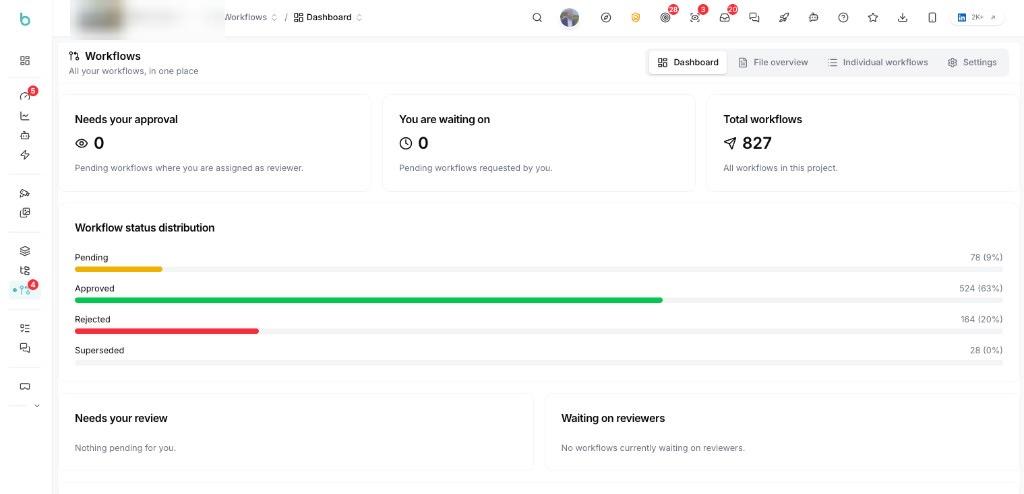
The team organizes each project around the ISO 19650 information states — Work in Progress, Shared and Published. Bimefy enforces the configured WIP → Shared → Published workflow, so a file only changes state after an approval.
The team develops models and documents in the WIP container of the CDE. That is the internal development space: drafts stay there until the author is ready to share them, and they are not yet the information the rest of the project should work from.
When a file is ready for review, the author requests a move from WIP to Shared. That starts an approval workflow in Bimefy. Reviewers accept or reject with a comment, and only an approved request places the file in Shared for cross-discipline coordination.
A second approval takes coordinated information from Shared to Published. Published is the formal issue state: the version the client and the project team are expected to work from, with a recorded trail of who approved it and when.
What supports this workflow
Each project is set up as a CDE with the ISO 19650 containers — Documents, WIP, Shared, Published and Archive — so draft, coordinated and issued information stay clearly separated.
Bimefy enforces the configured WIP → Shared → Published workflow. Promoting a file raises a review request; reviewers accept or reject with a comment, and the file only changes state when that request is granted.
Each transition is recorded: who requested it, who approved or rejected it, and when. That history is the audit trail for issued information.
Approved transitions sit on a versioned file, so the project team can see which version was reviewed and which one should be used.
Building & Partners has a consistent process for moving project information from development to coordination and formal issue. Draft, Shared and Published information remain clearly separated, while every transition is controlled through an approval workflow.
The approval history provides a traceable record of who requested, reviewed and approved each transition. This gives the project team a clearer view of which information is current and approved for use.
Control how project information moves from WIP to Shared and Published, with approvals, version history and traceability built into the workflow.








Trusted by innovation driven companies
See how other construction teams work with Bimefy
On one of its projects, a contractor uses Bimefy to connect site captures with the BIM model and the project planning, so the team can see how the works are progressing.
View use caseA large contractor combines dedicated Bimefy cameras with its existing security cameras, which share a scheduled site image once an hour, so project stakeholders can see more of the construction site from one project environment.
View use caseAPK Wegenbouw and its partners capture site works in 360° at successive moments and compare each walkthrough directly with the BIM model.
View use case